What audit mode does differently
The difference is in who makes the choice.
In Express mode the AI goes through the whole classification and gives a result. You can accept it or not, but the steps in between are not recorded.
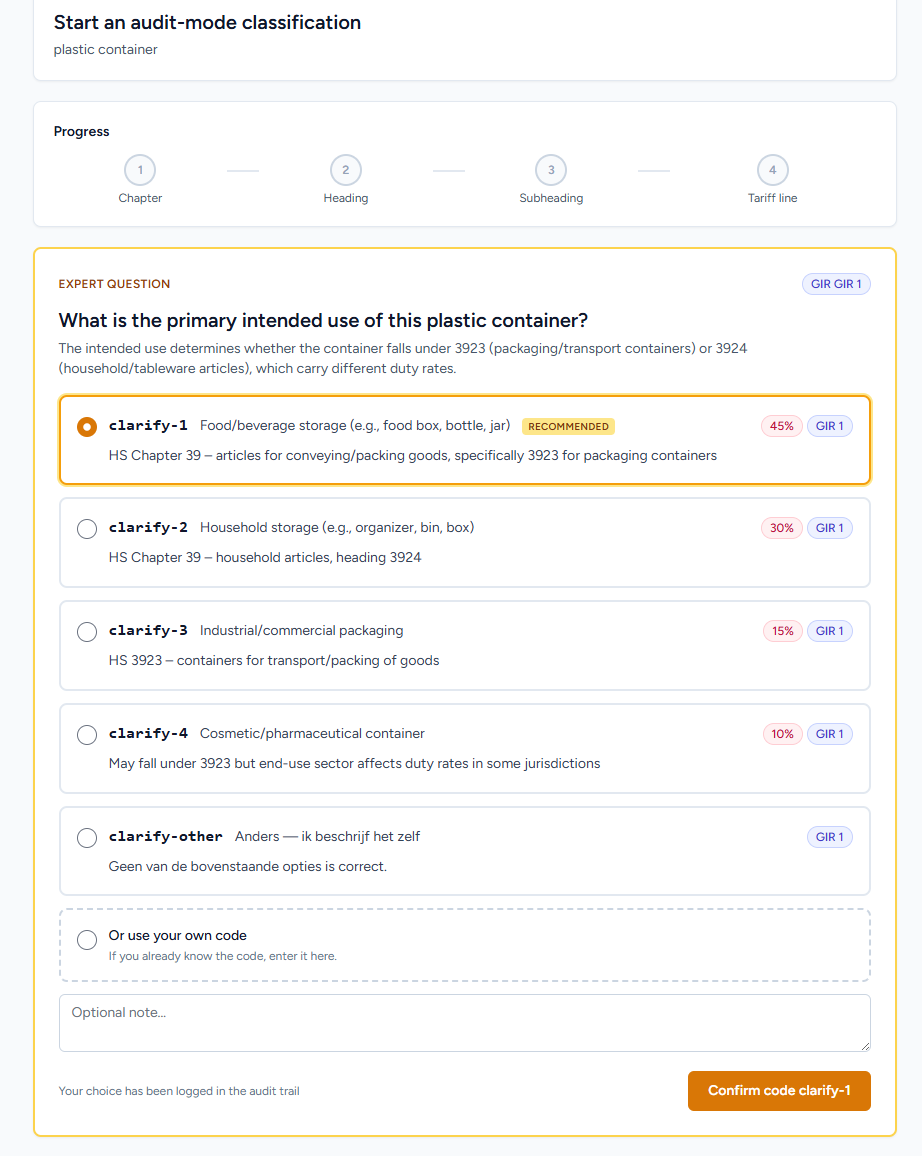
In audit mode you make the choice together, at every branch. The AI does the search work: it reads the photo and the description and puts the best options at each step (chapter, heading, subheading, tariff line). You see those options with the reason and confirm one. That confirmation is recorded.
That makes a difference for three reasons.
In the hard cases.
If a product falls neatly into one chapter, the AI does well. But sometimes two headings both fit, for example a product that is both textile and plastic, or a device between chapter 84 and 85. That is where your knowledge comes in. You know how the product is sold and can make the call. The AI narrows the options, you choose.
You confirm every step.
In audit mode Import8 only moves to the next step after you have confirmed the previous one. Even when the AI is sure of its advice, you see the other options. That way the file shows that a person made every choice consciously, which is what matters in an audit.
You get more than a code.
Express gives a code. Audit mode gives a code plus the whole decision path: what was considered at each step, what was rejected, which rule applied, who confirmed it and when. With that path you can support the code later.
You can also let the AI do everything and approve once at the end. Then the file only shows that approval. In audit mode it shows, per step, what you confirmed.
What happens at each step
Audit mode follows the structure of the nomenclature itself, from broad (chapter) to precise (10-digit tariff line).
First the description
Before the first choice, Import8 reads the photo and writes a description: material, shape, purpose and the important features. You check and confirm it first. If it is wrong, you correct it. That matters, because all later choices rest on that description, and it is the start of the decision path in the PDF.
The chapter
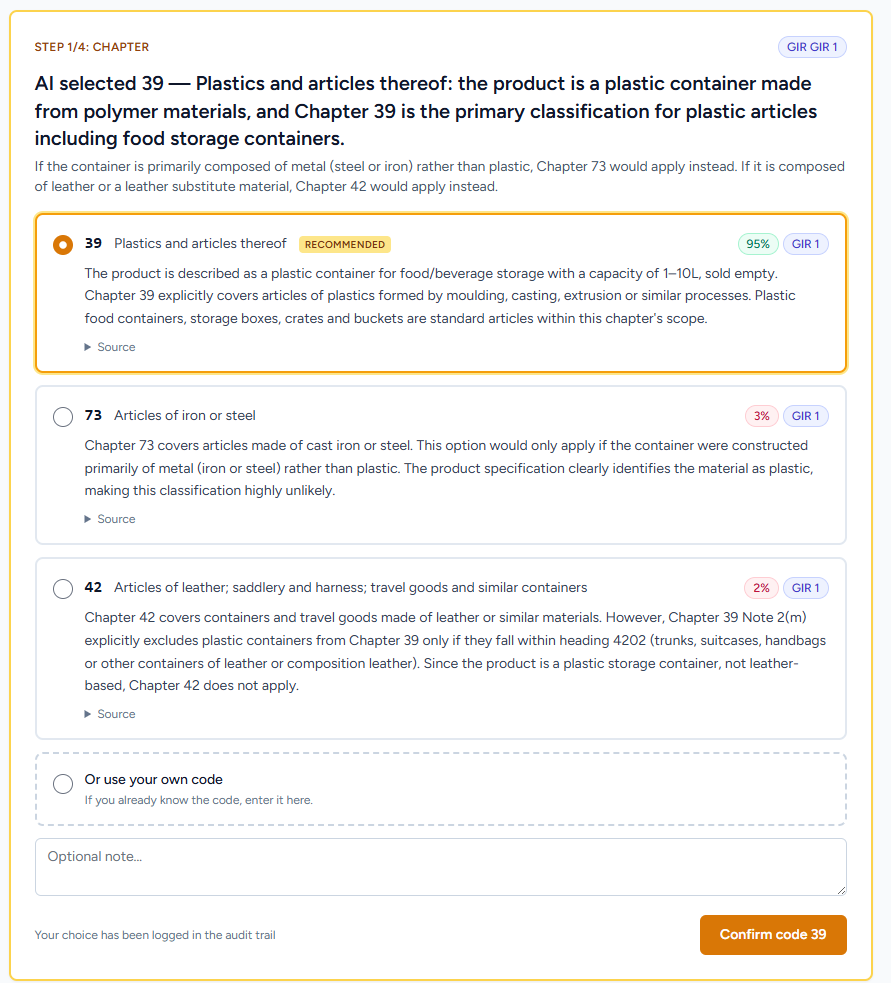
At chapter level the AI shows 2 to 5 options. Each option shows the chapter title, the General Rule for the Interpretation that supports it, the note that goes with it and how sure the AI is. The advice is already selected, but you look at the other options before you confirm. For a leather handbag, chapters 42 and 63 can appear. The AI explains why 42 applies (leather goods, GIR 1, a note that excludes textile articles) and why 63 does not. You confirm chapter 42.
Heading and subheading
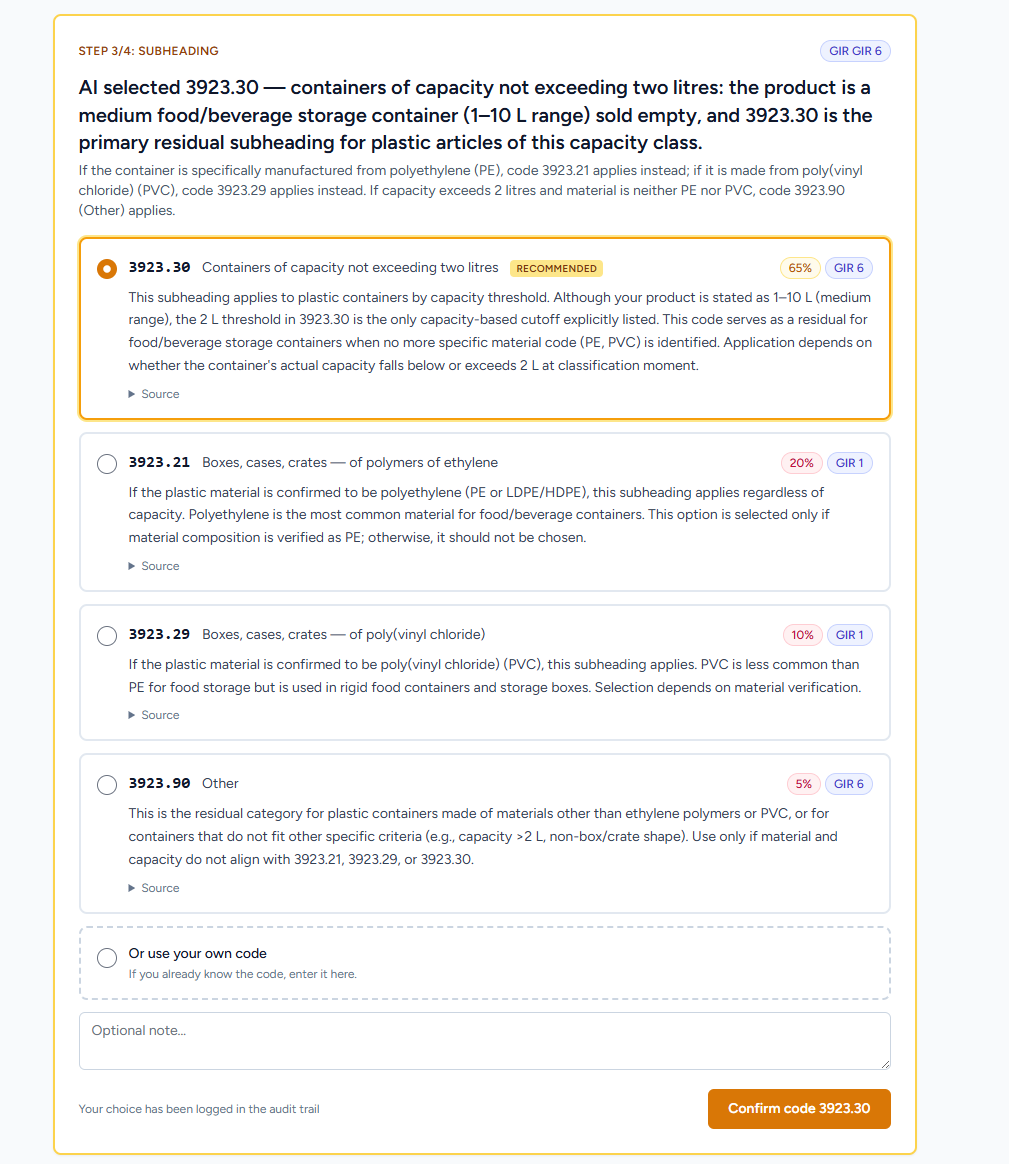
Heading and subheading work the same way. For heading 4202 (travel goods and handbags), heading 4205 (other leather articles) can be an option. Each option shows the heading text, the note that makes the difference and the classification rule. At subheading level, 4202.21 (outer surface of leather) and 4202.22 (outer surface of plastic or textile) depend on the material, and that is often disputed. Audit mode makes the difference visible and records which option you chose and why.
The tariff line
The last step goes from 8 to 10 digits, the TARIC level. That is where duties and trade measures apply, and where a mistake costs money directly. Import8 shows the tariff lines under your subheading, with any trade measures.
What is recorded at each step
At each step Import8 records:
- the confirmed code and the reason for that choice
- the options that were shown and rejected, with their reason
- which classification rule decided the choice
- the section or chapter note that was used
- the moment of confirmation
In an audit the list of rejected options counts most. It shows you chose the code knowing the alternatives.
See it in action
A real run in audit mode: a plastic storage box, from the first question to the confirmed tariff line.
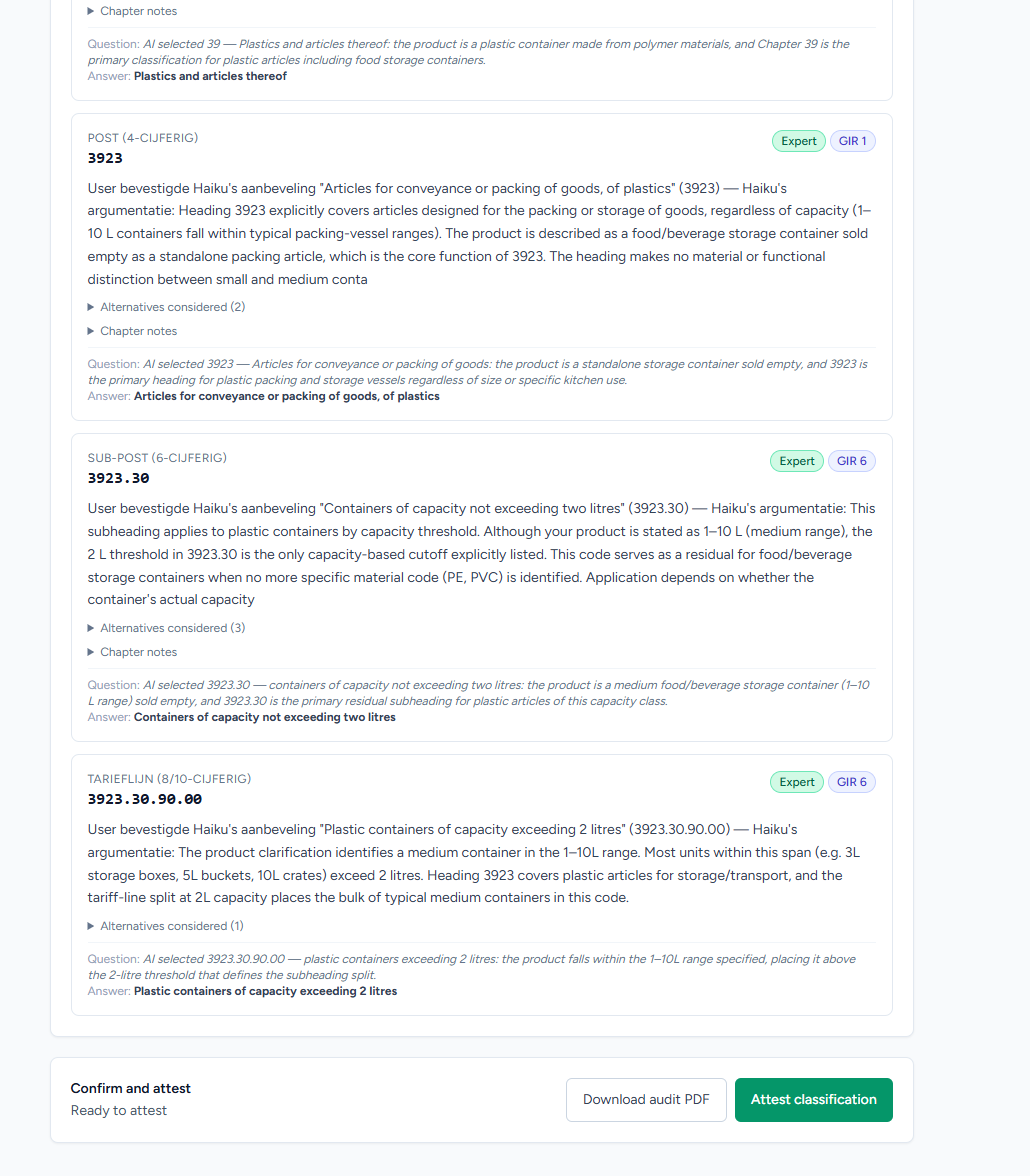
The audit PDF
At the end of a session Import8 makes a PDF with the whole choice, step by step.
What is in it
The PDF starts with the 10-digit tariff code, the confirmed description and the photo. Then the decision path follows step by step: chapter, heading, subheading, tariff line, with every confirmation. Each step shows the chosen option, the other options, the classification rule and the text from the nomenclature.
Below that it lists the versions that were used, so you can repeat the result later: the version of the AI model, the version of the prompt and the version of the TARIC nomenclature at the time. It also records when the session took place, the device and browser of the person who signed, and the IP address at signing.
Still repeatable years later
In a post-clearance audit under Article 48 UCC, customs can look back three years (for underpayment without fraud), sometimes longer. So a code from today can be reviewed in 2028. Because the versions are in the PDF, you can then repeat the classification with the same model, the same prompt and the same TARIC version. That lets you show how the code came about. Whether the code was right remains for customs to judge.
And a binding tariff information?
The PDF does not replace a BTI (binding tariff information). You get a BTI from customs under Articles 33 to 37 UCC. With a valid BTI, that classification binds customs for three years. The audit PDF does not give that certainty.
What the PDF does show is that you worked with care. Under Article 15 UCC you are in a stronger position if you can show a fixed method: you consulted the nomenclature, applied the classification rules, looked at alternatives and had every step confirmed by someone who knows the subject. Under Article 119 UCC (remission in good faith) that care counts. The PDF is the evidence of it.
Try audit mode
When to choose audit mode
Audit mode is not always needed. Express (without confirmation steps) is better when speed matters more than records: many small web shop orders, products whose code is already settled, or a quick check before you order.
How to choose:
| Situation | Mode |
|---|---|
| Web shop, low value per shipment | Express |
| Quick check before you order from a supplier | Express |
| Product you import often, code already settled | Express |
| High-value shipment (a lot of duty at stake) | Audit |
| Regulated product group: textiles, electronics, toys, food | Audit |
| AEO status or requirements from the parent company | Audit |
| Forwarder filing declarations for a client | Audit |
| Received a correction after a post-clearance audit | Audit |
| Two codes with a large difference in duty, and you are unsure | Audit |
Audit mode pays off most for a high value in a regulated product group: a large textile shipment, an electronic part that can also have military use, or a product under an anti-dumping investigation.
You can use both. Within one organisation you can use both modes. Express for the normal work, audit mode for the shipments where you must be able to justify the code. In Express mode the 6-digit code was right for 92% of 197 tested EBTI rulings. Audit mode adds your confirmation where the AI would otherwise have to estimate.
How each step works is above, under What happens at each step.
How we test Express mode is on the benchmark page.
The problem with a code without an explanation
Many tools work like this: you upload a photo or description and get a 10-digit HS code back. For many small, low-value shipments that is fine. For the rest, something is missing.
If customs asks why you declared a shipment under heading 4202 and not 6307, "the AI said so" is not an answer. You then need to show who made the choice and why.
Under the Union Customs Code (UCC) you as the declarant are responsible for the accuracy of your declaration. Article 15 requires that what you give to customs is accurate, complete and authentic. Article 77 ties the customs debt to the declaration itself. If a wrong code made you pay too little, you can ask for remission under Article 119, but only if you show you acted in good faith and with care. A code from a tool alone does not show that.
What matters: can you show how you got to the code?
Even a system that scores 92% in tests is sometimes wrong. Then the question is not only whether the code was right, but also whether the person who filed the declaration made a reasoned choice with what they knew at the time. If no person was part of the choice, you cannot record that.
What a wrong code costs depends on the product, the value and the duty. For textiles, electronics and goods under trade measures, the difference between two codes can be large. Post-clearance audits under Article 48 UCC are normal work for customs. If the auditor finds a pattern of wrong codes, they ask how you classify. "We use an AI tool" without records is a weak answer then.
Audit mode is made for this. What goes wrong without a fixed method is in the common HS code mistakes.
